Js- object, prototype, inheritance
in Javascript
참고
[1] https://ko.javascript.info/callbacks
- 객체
- 프로토타입
- for..in 반복문과 hasOwnProperty
- 함수의 prototype property
- 네이티브 프로토타입(object prototype)
- 모든 객체의 Constructor
- 프로토타입을 통해 메소드 빌려오기
- proto 사용하지 않기
- 번외) dictionary 만드는 법.
객체
- 자바스크립트에서 객체는 dictionary의 구조를 가지고 있다.
- 파이썬에서 dict를 선언할 때처럼, 중괄호를 사용하여 선언을 한다.
- 하지만 dict와 같은 구조임에도 객체의 특징인 method를 가질 수 있고, 상속의 개념 또한 가지고 있다.
- 객체의 멤버 변수를 property, 멤버 함수를 method라고 부른다.
객체의 선언방법
- 자바스크립트에서 객체를 생성할 때는 반드시 constructor의 도움이 필요하다.
- 코드상에서 constructor를 사용하지 않았더라도 내부적으로 사용하여 객체를 생성한다. 1. 객체 리터럴(object literal)
- 객체 리터럴로 생성하는 객체는 new Object({}) 구문을 통해서 객체를 생성하는 것과 동일하다.
let obj = {
  name: "사랑",
  hobby: "간식먹기",
  play: function() { alert("야옹~~"); }
}
2. 생성자(constructor)
obj = new Object();
obj.name = "사랑";
obj.hobby = "간식먹기";
obj.play = function() { alert("야옹~~"); };
obj2 = new Object({
  name: "사랑",
  hobby: "간식먹기",
  play: function { alert("야옹~~"); }
});
function Sarang(){
  this.name = "사랑",
  this.hobby = "간식먹기",
  this.play = function { alert("야옹~~"); }
}
obj3 = new Sarang();
객체는 기본적으로 참조형이다.
- 자바스크립트에서 객체는 기본적으로 참조형이다.
- 즉 실제의 객체는 하나만 존재하고 객체의 이름(변수)들이 해당 객체를 참조하고 있는 것이다.
- 그렇기 때문에 의도하지 않은 값이 바뀌는 것에 주의해야 한다.
- 복사를 하기 위해서는 얕은 복사 혹은 깊은 복사를 해야만 한다.
const A = {a: 1, b: 2};
const B = A;
B.a = 100;
console.log(A.a); // 100
객체의 property flag
- 객체의 property는 값(value)뿐만 아니라 flag라 불리는 특별한 속성 세 가지를 갖는다.
- 일반적인 방법으로 property를 만들면 flag의 값은 모두 true이다.
- writable : true 이면, value를 수정할 수 있다.
- enumerable : true 이면, 반복문(for)을 사용할 때 검색된다.
- configurable : true 이면, property 삭제나 flag 수정이 가능하다.
- configurable을 false로 설정하면 true로 되돌릴 수 없다. 즉 flag는 영원히 변경할 수 없다.
객체의 descriptor
- 객체의 어느 한 property에 대한 값(value)와 flag의 정보를 가지고 있는 객체.
- Object.getOwnPropertyDescriptor(obj, propertyName) 메소드를 통해 객체의 어떤 property의 descriptor를 추출할 수 있다.
let user = { name: "John"}; let name_descriptor = Object.getOwnPropertyDescriptor(user, "name"); /* name_descriptor = { value: "John", writable: true, enumerable: true, configurable: true } */- Object.defineProperty(obj, propertName, descriptor) 메소드를 통해 flag를 정의 및 변경할 수도 있다.
- 기본 flag들이 false로 설정된다.
let user = {}; Object.defineProperty(user, "name", { value: "John" }); let name_descriptor = Object.getOwnPropertyDescriptor(user, "name"); name_descriptor = { value = "John", writable = false, enumerable = false, configurable = false }- Object.defineProperties(obj, descriptors) 메소드를 통해 property 여러개를 한번에 정의할 수도 있다.
- Object.getOwnPropertyDescriptors(obj) 메소드를 사용하면 객체의 모든 property의 descriptor들을 얻을 수 있다.
let user = {}; Object.defineProperties(user, { name: { value: "John", writable: true, enumerable: true, configurable: true}, surname: { value: "Smith", writable: true, enumerable: true, configurable: true}, // ... }); let descriptors = Object.getOwnPropertyDescriptors(user); /* descriptors = { name: { value: "John", writable: true, enumerable: true, configurable: true}, surname: { value: "Smith", writable: true, enumerable: true, configurable: true}, } */- property descriptor는 특정 하나의 property를 대상으로 한다.
- 아래 메소드들은 한 객체 내 모든 property를 대상으로 제약사항을 만든다.
- Object.preventExtensions(obj) : 객체에 새로운 property를 추가할 수 없게 한다.
- Object.seal(obj) : 객체의 모든 property의 configurable flag를 false로 설정한다.
- Object.freeze(obj) : 객체의 모든 property의 configurable, writable flag를 false로 설정한다.
객체의 accessor property
- 자바스크립트의 객체의 property는 data property, accessor property 두개로 나뉜다. 기본적인 property는 data property를 지칭한다.
- accessor property의 본질은 함수이다. 이 함수는 value를 get하고 set하는 역할을 담당한다.
- 본질은 함수이지만 실제 사용할때는 data property처럼 사용한다. left-value는 set, right-value는 get의 느낌.
let user = {
name: "John",
surname: "Smith",
set fullName(value) { // user.fullName = value;
  [this.name, this.surname] = value.split(" ");
},
get fullName() { // ... = user.fullName
  return `${this.name} ${this.surname}`;
}
};
alert(user.fullName); // John Smith
user.fullName = "Alice Cooper";
accessor property의 descriptor
- 일반 data property의 descriptor와는 다르게 accessor property의 descriptor는 value와 writable이 없는 대신 get() function과 set() function이 있다.
let user = {
  name: "John",
  surname: "Smith"
};
Object.defineProperty(user, 'fullName', {
  get: function(){
      return `${this.name} ${this.surname}`;
  },
  set: function(value){
      [this.name, this.surname] = value.split(" ");
  }
  enumerable: true,
  configurable: true
});
키를 통한 접근 및 iterable 하게 property 설정
- 앞서 말한 것처럼 자바스크립트에서 객체는 dictionary의 구조를 띄기 때문에 키를 통해 접근할 수 있다.
- 키를 통해 접근할 때는 반드시 문자열을 사용해 접근해야만 한다.
- 문자열을 사용하지 않고 접근할 경우, 내부적으로 문자열로 바꾼 뒤에 접근한다.
let rabbit = {
name: "white rabbit"
};
let animal = 'animal';
rabbit[animal + 5] = "rabbit species"; // rabbit["animal5"] = "rabbit species"
rabbit[45] = "red"; // rabbit['45'] = "red"
프로토타입
- 자바스크립트는 다른 객체지향언어와 다르게 클래스가 존재하지 않는다.
- 대신 prototype이라는 개념을 이용하여 다른 객체를 상속한다.
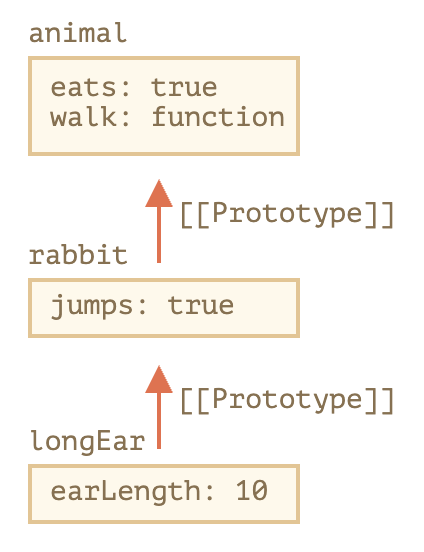
- 모든 자바스크립트의 객체는 [[Prototype]] 이라는 hidden property를 가지고 있다.
- [[Prototype]] property는 null 혹은 다른 객체에 대한 참조가 되는데, 다른 객체를 참조할 경우 참조 대상을 prototype object이라고 한다.
- 클래스의 상속이랑 다르게 prototype은 상위 객체의 참조를 나타낸다는 것에 주의하자.(상위 객체가 변하면 그것을 참조하던 하위 객체들도 변한다)
- 프로토타입에서 상속받은 프로퍼티를 상속 프로퍼티(inherited property)
- [[Prototype]] property는 proto property를 통해서 직접적인 접근할 수 있다.
- 하지만 proto property를 통해서 prototype object에 접근하는 것은 권하지 않는다.
- prototype object는 하나의 객체만 설정할 수 있다.
let animal = {
  eats: true,
  walk() {
      alert("동물이 걷습니다.");
  }
};
let rabbit = {
  jumps: true,
  __proto__: animal
};
let longEar = {
  earLength: 10,
  __proto__: rabbit
};
longEar.walk(); // 동물이 걷습니다.
alert(longEar.jumps); // true (rabbit에서 상속받음)
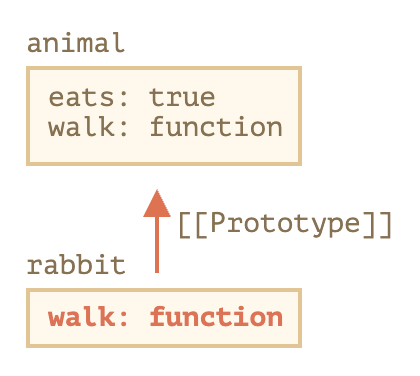
- 프로토타입 객체를 통해 상위 객체를 수정할 수는 없다. (inherited object를 통해서 수정할려면 __proto__를 통해 접근해야만 한다)
- 수정을 요청할 경우 현재 객체에 새로운 property, method가 추가될 뿐이다.
let animal = {
eats: true,
walk() {
  /* rabbit은 이제 이 메서드를 사용하지 않습니다. */
}
};
let rabbit = {
__proto__: animal
};
rabbit.walk = function() {
alert("토끼가 깡충깡충 뜁니다.");
};
rabbit.walk(); // 토끼가 깡충깡충 뜁니다
for..in 반복문과 hasOwnProperty
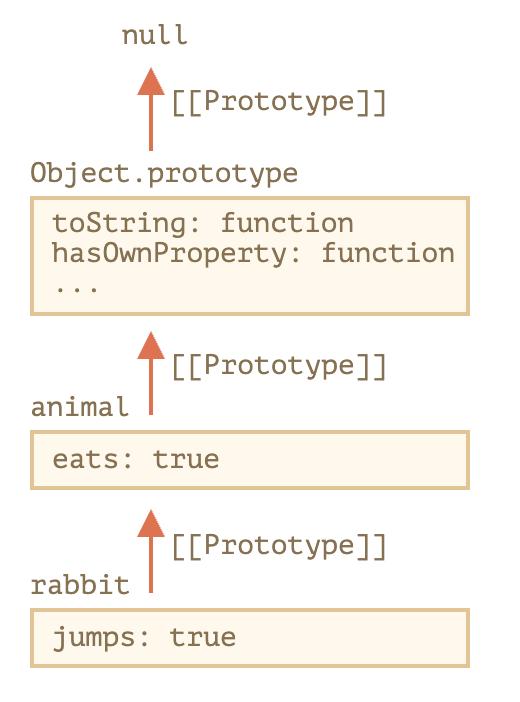
- Object.keys(obj)는 obj 객체 자신의 키만 반환한다.
- for…in 구문을 사용하면 상속하고 있는 모든 property의 키를 순회한다. (Object 객체 같이 기본 객체들?은 대부분이 enumerable: false라서 이렇게 검색해도 괜찮을 수 있다)
- obj.hasOwnProperty(key)를 이용하면 객체 자기 자신의 키만을 구별해 낼 수 있다.
let animal = {
  eats: true
};
let rabbit = {
  jumps: true,
  __proto__: animal
};
alert(Object.keys(rabbit)); // name
for(let prop in rabbit){
  let isOwn = rabbit.hasOwnProperty(prop);
  if (isOwn) {
      alert(`객체 자신의 프로퍼티: ${prop}`);
  } else {
      alert(`상속 프로퍼티: ${prop}`);
  }
}
함수의 prototype property
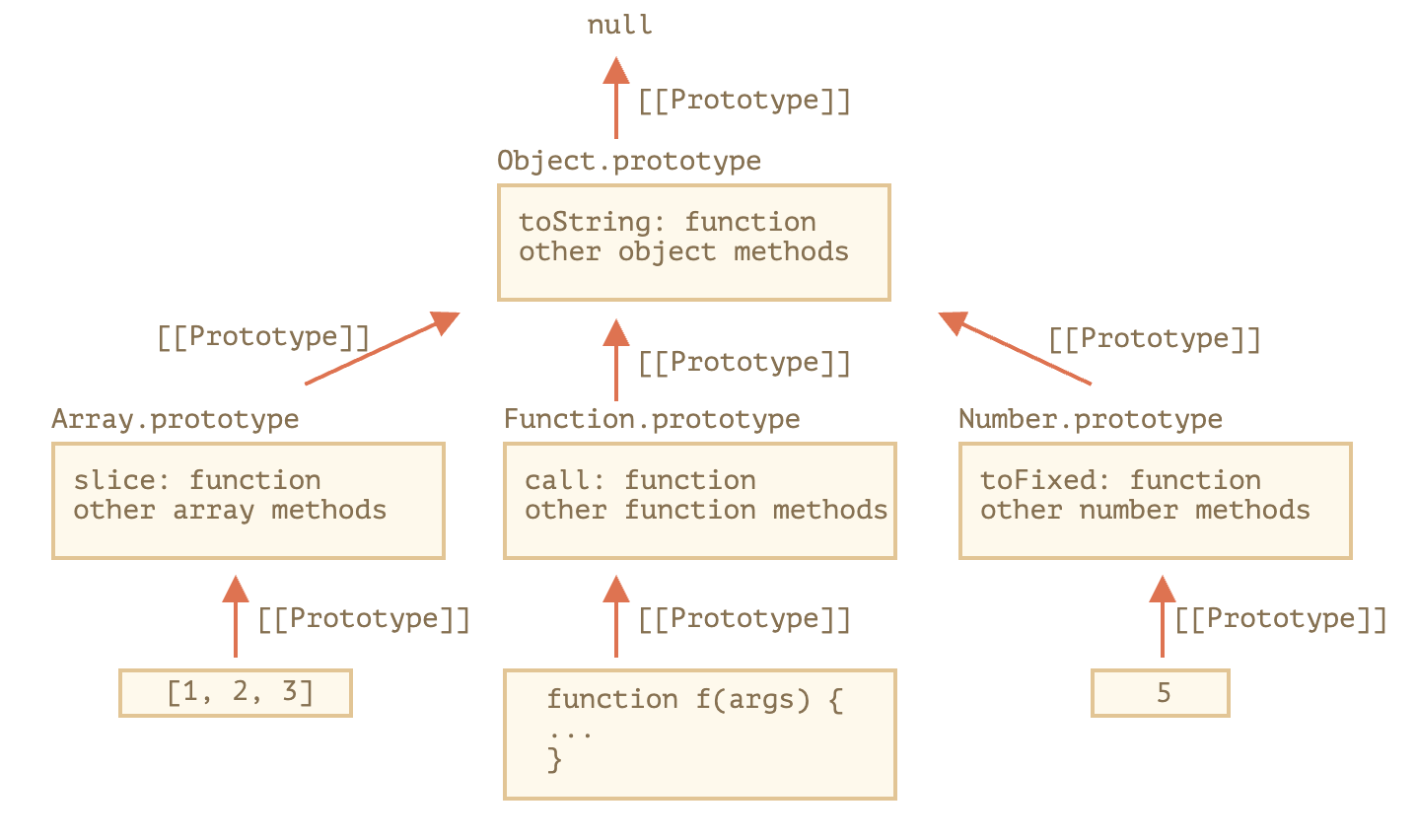
- 자바스크립트에서는 함수 또한 객체로 인지된다. Function 함수에 의해 생성된 객체이다. [[prototype]]으로 Function.prototype을 가진다.
- 일반 객체처럼 property를 가질 수도 있고 심지어 method도 가질 수 있다.
- 또한 다른 함수에 인자로 전달, 리턴될 수도 있다.
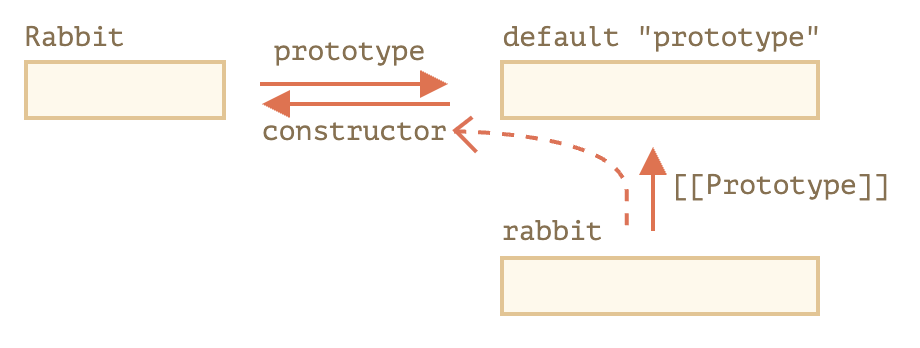
- 함수는 또한 prototype이라는 property를 가지고 있다.
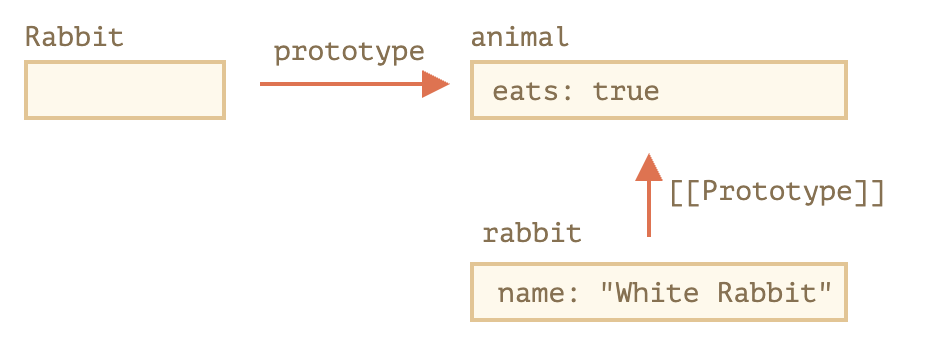
- 함수의 prototype property는 해당 함수를 통해 new 구문을 사용해서 객체를 만들경우 해당 객체의 prototype 객체를 함수의 prototype property가 참조하고 있는 객체로 정하겠다는 소리이다.
- 따라서 함수의 prototype property는 new 구문을 사용할 때만 사용된다.
- 함수를 만들면 함수의 constructor가 있고 함수의 prototype의 constructor가 있는데, 함수의 constructor은 Function 함수를 의미하고 함수의 prototype constructor가 자기자신을 의미한다.
let animal = {
  eats: true
};
function Rabbit(name) {
  this.name = name;
}
Rabbit.prototype = animal;
let rabbit = new Rabbit("White Rabbit"); //  rabbit.__proto__ == animal
alert( rabbit.eats ); // true
- 또한 함수의 prototype을 직접 지정하지 않더라도 모든 함수는 prototype property를 갖는다.
- 디폴트 prototype property는 constructor method 하나만 있는 객체를 가리킨다.
- 또한 그 constructor method는 함수 자기자신을 가리킨다.
- 객체를 만드는데 constructor 메소드가 사용되는 것은 아니다. (저장용도인가??)
- class에서는 constructor 메소드가 사용된다.
function Rabbit(){}
let rabbit = new Rabbit();
- 어떤 객체가 어떤 생성자가 사용되었는지 알 수 없는 경우에 이 방법을 유용하게 쓸 수 있다.
- 다만 함수의 기본 prototype property를 바꾸면 constructor 메소드는 Object function을 가리키게 된다.
- 이와 같은 문제를 경험하지 않기 위해서는 함수의 prototype property를 직접적으로 바꾸지는 말고 속성을 추가하는 식으로 하자.
function Rabbit(name){ this.name = name;}
Rabbit.prototype.jumps = true;
let rabbit = new Rabbit("white rabbit");
let rabbit2 = new rabbit.constructor("black rabbit");
실수할만한 예시
- prtotype 변경하기
function Rabbit(){}
Rabbit.prototype = { eats : true };
let rabbit = new Rabbit();
//
Rabbit.prototype.eats = false;
alert(rabbit.eats); // false
//
delete rabbit.eats;
alert(rabbit.eats); // false
//
delete Rabbit.prototype.eats;
alert(tabbit.eats); // undefined
네이티브 프로토타입(object prototype)
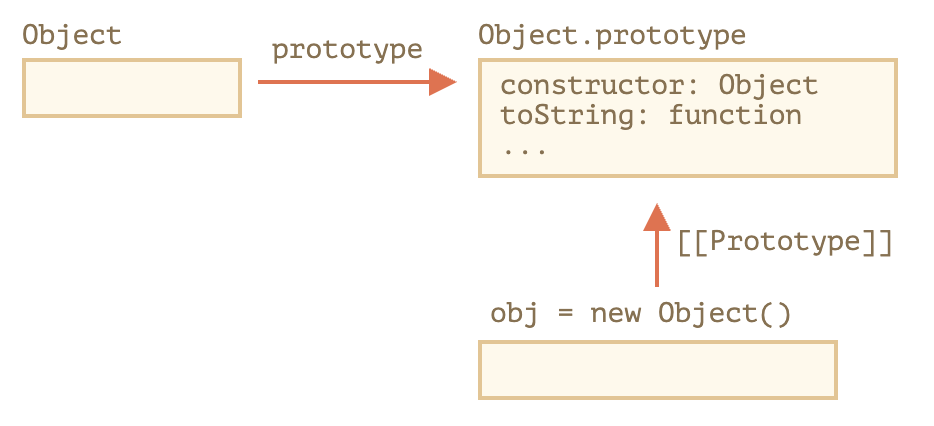
- Object 함수의 prototype은 Object 객체이며, Object 객체는 자바스크립트의 가장 상위에 존재하는 객체이고 prototype 객체로 null 값을 가진다.
let obj = {};
모든 객체의 Constructor
- 자바 스크립트는 모든 것이 객체로 이루어져 있다고 봐도 무방하다.
let arr = [1, 2, 3];
let f = function (){}
let d = 5;
alert(f.__proto__ == Function.prototype); // Function 함수가 있고 함수들은 new Function을 통해 생성된다.
프로토타입을 통해 메소드 빌려오기
- 한 객체의 메소드를 다른 객체로 복사할 수 있다.
- 내장 객체는 객체를 통한 접근보다는 constructor을 통해 접근한다.
let obj = {
0: "Hello",
1: "world",
length: 2
};
obj.join = Array.Prototype.join;
alert(obj.join(',')); // obj[0] + ',' + obj[1] == Hello,world!
proto 사용하지 않기
- proto property를 사용하는 것은 더이상 권하지 않는다. 최근에 나온 객체들 중에는 proto property를 지원하지 않는 경우도 있다고 한다.
- 따라서 prototype 객체에 접근하기 위해 proto property가 아닌 다른 method들을 사용하자.
- Object.create(obj) : Prototype 객체가 obj인 새로운 객체를 생성한다.
- Object.getPrototypeOf(obj) : obj의 Prototype 객체를 반환한다.
- Object.setPrototypeOf(obj, proto) : obj의 Prototype 깩체가 proto가 되도록 설정한다.
let animal = { eats: true } let rabbit = Object.create(animal); alert(Object.getPrototypeOf(rabbit)); // animal Object.setPrototypeOf(rabbit, {}); // rabbit의 prototype은 {}- Object.create 메소드를 이용하면 for…in + hasOwnProperty property를 사용한 것보다 더 쉽게 객체를 복사할 수도 있다.
// create 메소드는 두번째 인자로 객체에 대한 Descriptor을 인자로 받아 해당 descriptor대로 property와 method를 추가할 수 있다.
// 모든 property가 복사된 완벽한 사본이 만들어진다. 물론 prototype 객체는 참조형이다.
let clone = Object.create(Object.getPrototypeOf(obj), Object.getOwnPropertyDescriptors(obj));
번외) dictionary 만드는 법.
- 앞서 말한 것처럼 자바스크립트에서 객체는 dictionary의 구조를 띈다고 했다.
- 따라서 순수한 dictionary 객체를 만들고 싶다면 아무런 객체를 만들고 prototype 객체를 설정하지 않으면 된다.
let dict = Object.create(null);
dict.hello = "안녕";
dict.bye = "안녕";